
AI video generator
Make AI videos with sound from words, photos or your own clips.
Every clip on this page tells one story, a night at a ramen stall, so you can see exactly what each feature adds: from a photo coming alive to changing a finished video with one sentence.
One story, seven features
One night at a ramen stall.
Each clip shows what went in and what came out, with what it cost. All are 5 seconds at 720p unless noted.
- 1
Animate a photo · Wan 3.0
Morning at the fish market

The photo What was typed
“He lifts the mackerel from the ice, turns it in the light to check its eye and gills, nods with satisfaction to the seller off camera and drops it into his basket. The market bustles around him, other buyers walking past.”
5 seconds, 720p70 credits · €1.40 - 2
First and last frames · Wan 3.0
Opening the stall
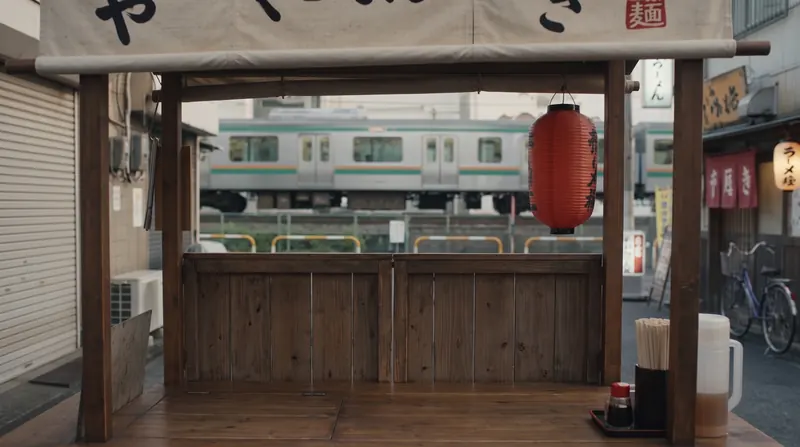
First frame 
Last frame What was typed
“Day turns to night at the ramen stall: the chef walks in, slides open the wooden shutters, unrolls the cloth banner and lights the red paper lantern, the sky darkens, rain begins to fall and steam starts rising from his pot as he takes his place behind the counter. Same camera position throughout.”
5 seconds, 720p70 credits · €1.40 - 3
Text to video, with sound · Gemini Omni
Rain and noodles
What was typed
“Night in a narrow Tokyo alley during heavy rain. A ramen chef in his fifties with short grey hair, a grey stubble beard, a navy headband and a white apron stands behind the counter of his small wooden street stall under a glowing red paper lantern. In front of him are a large pot of boiling water on the left and a bowl of broth on the counter on the right. He dips a deep, long-handled mesh noodle strainer into the boiling pot, lifts it out full of noodles while hot water streams out through the mesh back into the pot, snaps it down sharply twice to shake off the last water, then turns and tips the drained noodles into the bowl. The noodles stay inside the strainer until he tips them into the bowl. Steam rises from the pot, rain drums on the canvas awning and drips from its edge, and a train rattles past in the distance. Static camera at counter height facing the chef, with both the pot and the bowl in frame. Realistic and cinematic.”
Words only. This clip set the chef and the stall that every other clip uses.
5 seconds, 720p73 credits · €1.46 - 4
Edit with a sentence · Gemini Omni
What if it snowed?
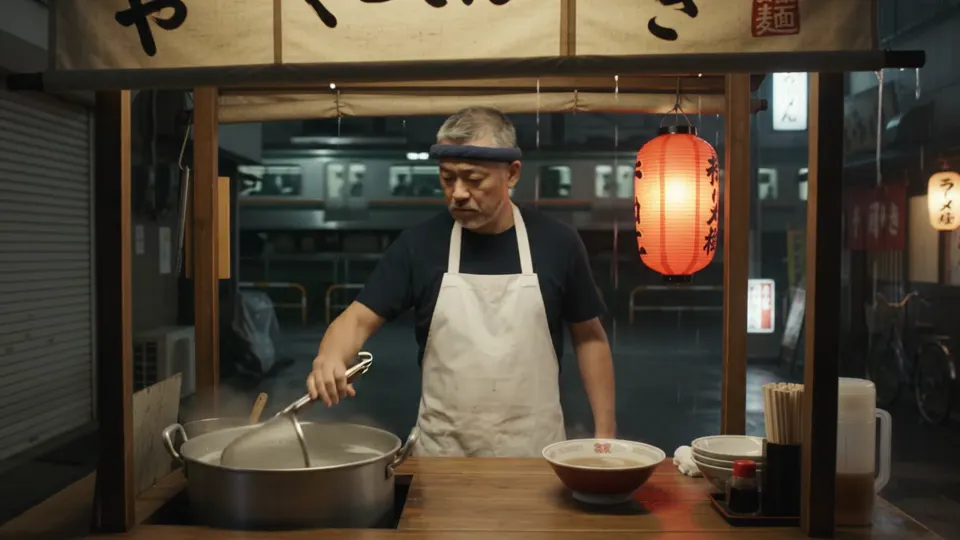
Clip 3 What was typed
“Turn the whole scene into a snowy winter night: instead of rain, heavy snow falls across the entire alley and the street behind the stall, with snow covering the ground, the rooftops, the train and the parked bicycles, and snowflakes drifting past the lantern. No rain anywhere. The stall's roof keeps the inside dry, so there is no snow on the chef or the counter. Keep the chef, the stall and everything he does exactly the same.”
5 seconds, 720p80 credits · €1.60 - 5
Extend past the last frame · Gemini Omni
The first customer
Clip 3 What was typed
“Continue the shot: a young woman in a wet coat slides onto the stool in the front of the frame, the chef sets the steaming bowl in front of her with a small nod, and she snaps her wooden chopsticks apart and smiles.”
The first five seconds are clip 3; the last five are new.
10 seconds in total, 720p80 credits · €1.60 - 6
References · Wan 3.0
His signature bowl
Image 1: him and his stall 
Image 2: the bowl What was typed
“The ramen chef from Image 1 stands behind the counter of his street stall from Image 1 at night in the rain and proudly holds the bowl of ramen from Image 2 up towards the camera, steam rising from it, with a small satisfied smile. Slow push-in, warm lantern glow, like a restaurant commercial.”
5 seconds, 720p70 credits · €1.40 - 7
Put in a video · Wan 3.0
A new face behind the counter




Aiko, made in the AI influencer generator: four faces, number four picked.
Clip 3, the source video No words needed: pick your AI influencer and the clip. Her movements, the light and the sound all come from clip 3.
5 seconds, 720p153 credits · €3.05
Two video models
Pick by the job.
Gemini Omni 1.1 Flash
- Edit a finished video with a sentence
- Extend it past its last frame
- Up to 4K, 3 to 10 seconds
- Landscape or portrait
From 27 credits (€0.54, 5 seconds at 360p)
Alibaba
Wan 3.0
- One take up to 30 seconds
- Five shapes, from square to portrait
- Up to 1080p
- Powers Put in a video for AI influencers
From 35 credits (€0.70, 5 seconds at 480p)
Questions, answered
Clear before you create.
The short version: one studio, one credit balance, no subscription, no ads, and no mystery controls.
Do the videos have sound?
Yes. Gemini Omni and Wan 3.0 both make sound to match the picture, like the rain and the passing train on this page. Put in a video keeps the sound of the clip you started from.
How long can a video be?
Gemini Omni makes 3 to 10 seconds per video and can extend a video in steps of up to 10 seconds. Wan 3.0 makes one take of up to 30 seconds.
Can I change a video after it is made?
With Gemini Omni, yes: Edit changes a finished video with one sentence, like turning rain into snow, and Extend continues it past its last frame.
Can I put myself or a real person in a video?
No. Put in a video swaps a fictional AI influencer you made in Nenis into a clip, like Aiko on this page. Real faces cannot be uploaded.
What does an AI video cost?
A 5-second video starts at 27 credits (€0.54). Every clip on this page shows what it cost, and the video workspace shows the exact price before anything runs. No subscription.